Creating a single project on Google Cloud is actually pretty simple.
You can open the Google Cloud Console, create a project, enable a few APIs, create a service account, grant IAM roles, set up a network, and start running your workload.
For a single project, this approach can still feel simple enough.
But what happens when the number of projects starts to grow?
What if you have development, staging, and production?
How do you make sure every project has the same IAM baseline?
How do you make sure the required APIs are always enabled?
How do you make sure networking, logging, security, and automation are all built following a consistent pattern?
And just as important:
What happens if, one day, that environment needs to be rebuilt from scratch?
This is exactly where Infrastructure as Code and the concept of a Landing Zone start to matter.
A Landing Zone helps us build a cloud foundation before application workloads start running on top of it.
Infrastructure as Code, meanwhile, helps that foundation become repeatable, versioned, reviewable, and rebuildable in a consistent way.
About This Infrastructure as Code Series
This article is the first part of a series that will walk through the journey of building GCP infrastructure using Infrastructure as Code.
The series will consist of six parts:
Infrastructure as Code Series 01
GCP Landing Zone
→ understanding cloud foundations and where Infrastructure as Code fits in

Infrastructure as Code Series 02
Terraform State
→ understanding how Terraform keeps track of infrastructure

Infrastructure as Code Series 03
Bootstrapping GCP
→ remote state, service accounts, IAM, and the initial foundation

Infrastructure as Code Series 04
Workload Identity Federation
→ connecting GitHub Actions to GCP without a service account JSON key

Infrastructure as Code Series 05
GCP Project Factory
→ creating projects and baseline infrastructure in a repeatable way

Infrastructure as Code Series 06
Terraform Modules
→ turning infrastructure patterns into reusable building blocks
This first part will focus on the big picture first.
We won't go too deep into Terraform syntax or technical implementation just yet.
The goal is to answer one basic question:
What are we actually building when we say
"a GCP Landing Zone with Infrastructure as Code"?
The Problem With Building Cloud Manually
Let's start with the simplest possible approach.
Say we want to create a new environment.
Done manually, the flow might look like this:
Engineer
→ Google Cloud Console
→ Create Project
→ Enable APIs
→ Create Service Account
→ Configure IAM
→ Create Network
→ Configure Logging
→ Deploy Workload
There's nothing inherently wrong with this flow.
The problem starts to show up once the same process has to be repeated over and over.
Say an organization has:
Development
Staging
Production
And each environment is made up of several projects.
Development
├── application
├── data
└── tooling

Staging
├── application
├── data
└── tooling

Production
├── application
├── data
└── tooling
If every project is created manually, small differences will gradually start to creep in.
Project A has a certain API enabled.
Project B doesn't.
The staging project uses one IAM role.
The production project uses a different one.
Firewall rules end up slightly different.
Service account permissions get granted manually, on an ad-hoc basis.
Logging might be configured in one project but not in another.
These small inconsistencies are known as configuration drift.
The more resources and environments you have, the harder it becomes to keep everything consistent.
What Is Infrastructure as Code?
Infrastructure as Code, or IaC, is an approach to defining and managing infrastructure through code or configuration files.
Where we previously built infrastructure through the console:
Engineer
→ Cloud Console
→ Infrastructure
With Infrastructure as Code, the flow changes into:
Engineer
→ Infrastructure Code
→ Automation
→ Cloud Provider
One of the most widely used tools for this approach is Terraform.
With Terraform, a resource can be represented as configuration.
A simple example:
resource "google_project_service" "compute" {
  project = var.project_id
  service = "compute.googleapis.com"
}
This configuration declares that a specific API should be enabled on a given project.
But the real value of Infrastructure as Code isn't just:
not having to click through the Google Cloud ConsoleIaC gives us a few capabilities that matter far more.
Repeatability
The same infrastructure can be recreated using the same code.
Consistency
Every environment can share a uniform baseline configuration.
Version Control
Infrastructure changes can be stored in Git.
We can always tell:
who changed what
when the change was made
why the change was made
Reviewability
Infrastructure changes can go through a Pull Request and code review before being applied.
Automation
Infrastructure can be provisioned through a CI/CD pipeline instead of always being done by hand.
In short:
Infrastructure as Code
=
Infrastructure that is defined,
reviewed,
and managed like software.
So, What Is a Landing Zone?
A Landing Zone is a cloud foundation that already has a baseline in place, so workloads can be built on top of it more safely and consistently.
A Landing Zone is not an application.
It's also not a single specific resource.
It's better understood as a set of foundational capabilities that are put in place before any workload starts running.
In simple terms:
Cloud Provider
      ↓
Landing Zone
      ↓
Projects
      ↓
Applications / Workloads
Or, looking at it from the bottom up:
Application
     ↓
Project
     ↓
IAM / Network / Logging / Security
     ↓
Landing Zone
     ↓
Google Cloud
A Landing Zone is where a workload "lands."
That's exactly where the name comes from.
A workload never drops straight into an empty cloud environment.
There's already a foundation in place that determines how projects are created, how identity is managed, how the network is structured, and how the security baseline is enforced.
Infrastructure as Code and Landing Zone Are Not the Same Thing
Infrastructure as Code and Landing Zone are often discussed together, but they each play a different role.
A Landing Zone is the foundation we want to build.
Infrastructure as Code is one way to define and manage that foundation.
In simple terms:
Landing Zone
=
What we're building

Infrastructure as Code
=
How we build it in a repeatable way
Put together:
Git Repository
      ↓
Terraform
      ↓
GCP Landing Zone
      ↓
Projects
      ↓
Applications
With this approach, the cloud foundation no longer lives only as configuration inside the Google Cloud Console.
That foundation also has a representation in code.
What Usually Lives Inside a GCP Landing Zone?
There's no single "correct" shape for a Landing Zone that works for every organization.
The requirements can vary depending on the size of the organization, the number of projects, security requirements, team structure, and the workloads being run.
But in general, there are a few components that commonly show up as part of a cloud foundation.
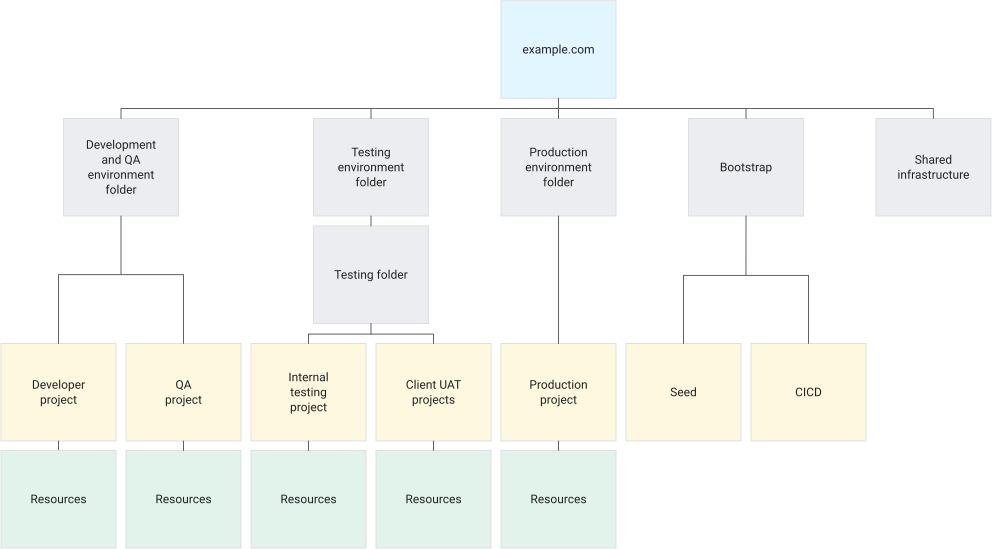
Organization and Resource Hierarchy
Google Cloud has a resource hierarchy.
In simple terms:
Organization
├── Folder
│   ├── Development
│   │   └── Projects
│   │
│   ├── Staging
│   │   └── Projects
│   │
│   └── Production
│       └── Projects
The hierarchy helps us group resources according to the organization's needs.
For example:
Organization
├── Platform
├── Shared Services
├── Development
├── Staging
└── Production
From that hierarchy, specific policies or IAM rules can be applied at the appropriate level.
Without a clear structure, projects can grow into a sprawling collection of resources that becomes hard to understand and manage.
Project
A project is one of the main boundaries in Google Cloud.
Most resources live inside a project.
For example:
- Compute Engine
- Cloud Storage
- GKE
- Cloud SQL
- Pub/Sub
- Secret Manager
- Artifact Registry
A project is also an important boundary for things like IAM, billing, API enablement, and quotas.
Because of that, one of the key jobs of a Landing Zone is deciding how projects are created and what baseline every project should have.
IAM Baseline
Identity and Access Management determines who can do what to a given resource.
In simple terms:
Principal
   ↓
Role
   ↓
Resource
A principal can be:
User
Group
Service Account
Workload Identity
The role, in turn, determines the permissions that are granted.
A Landing Zone should help make sure IAM isn't set up randomly on every single project.
For example:
Platform Admin Group
        ↓
Platform Role

Developer Group
        ↓
Developer Role

CI/CD Service Account
        ↓
Deployment Role
The goal isn't to make every IAM setup identical.
The goal is to make the pattern of granting access clearer, more consistent, and easier to audit.
Networking
Networking is also an important part of a cloud foundation.
A workload will eventually need a way to communicate.
For example, through:
VPC
Subnet
Firewall
Private connectivity
Load balancer
DNS
In a small environment, each project might have its own network.
In larger organizations, networking tends to evolve toward patterns like Shared VPC or a centralized network architecture.
What matters early on is understanding that networking isn't something that should be thrown together ad hoc the moment an application needs connectivity.
A Landing Zone helps establish a networking baseline before workloads grow too far.
API Enablement
Google Cloud is built around service APIs.
Before a resource can be used, the relevant service usually needs to be enabled first.
For example:
compute.googleapis.com
iam.googleapis.com
iamcredentials.googleapis.com
storage.googleapis.com
artifactregistry.googleapis.com
If APIs are enabled manually, it's very easy to end up in a situation like:
development
→ API enabled

staging
→ API enabled

production
→ someone forgot to enable it
With Infrastructure as Code, API requirements can become part of the configuration itself.
Terraform
   ↓
Enable Required APIs
   ↓
Create Resources
That makes each environment's requirements far more explicit.
Logging and Monitoring
A cloud foundation should also take visibility into account.
Once a workload is running, we want to understand what's actually happening inside the environment.
For example, through:
- Cloud Logging
- Cloud Monitoring
- Audit Logs
- centralized logging
- alerting
A Landing Zone doesn't need a fully mature observability architecture from day one.
But logging and auditability baselines should be thought through early.
Because the more projects you create, the harder it becomes to build visibility retroactively.
Security Baseline
Security is also a core part of a Landing Zone.
Some of the concerns that typically come up early include:
- IAM
- service accounts
- secrets
- network access
- audit logging
- resource policies
- environment separation
A Landing Zone doesn't mean every security problem is instantly solved.
But it does help make sure workloads aren't starting from an environment with no guardrails at all.
Terraform State
When Terraform is used to build a Landing Zone, there's one important concept you need to understand: Terraform State.
In simple terms:
Terraform Configuration
        ↓
Terraform State
        ↓
Actual Infrastructure
Terraform uses state to keep track of resources it has already created and how those resources relate to the current configuration.
For instance, Terraform knows that:
google_storage_bucket.tf_staterepresents a specific bucket in Google Cloud.
Without state, Terraform wouldn't have enough of a record to understand the infrastructure it's managing.
In environments shared by a team or by CI/CD, state usually can't just live on an engineer's laptop.
You need remote state.
For example:
Developer / CI
      ↓
Terraform
      ↓
Remote State
      ↓
Google Cloud
We'll go deeper into Terraform State in Infrastructure as Code Series 02.
Bootstrap: Infrastructure Before Infrastructure
This is where things get interesting.
Terraform needs somewhere to store its remote state.
Terraform might also need a service account to run automation.
But that bucket and that service account are themselves infrastructure.
Which raises a question:
If Terraform needs infrastructure in order to run,
who creates that very first piece of infrastructure?
This initial process is usually called bootstrap.
In simple terms:
Bootstrap
   ↓
Remote State Bucket
Service Account
IAM
Workload Identity
   ↓
Landing Zone
   ↓
Remaining Infrastructure
Bootstrap typically contains the minimum set of resources needed for everything that follows to run.
For example:
- remote state bucket
- Terraform service account
- IAM baseline
- Workload Identity Federation
- required APIs
Once that foundation is in place, Terraform can start managing the rest of the infrastructure in a much more structured way.
We'll dig deeper into bootstrapping in Infrastructure as Code Series 03.
How Does the Infrastructure Flow Change After Adopting IaC?
Without Infrastructure as Code, changes might happen like this:
Engineer
→ Log in to Google Cloud
→ Change Resource
→ Done
The problem is that other engineers might have no idea the change even happened.
There's no review.
There's no plan.
There isn't always a record of why the resource was changed.
With Infrastructure as Code, the flow can become:
Engineer
      ↓
Modify Terraform
      ↓
Git Commit
      ↓
Pull Request
      ↓
Terraform Plan
      ↓
Code Review
      ↓
Terraform Apply
      ↓
Google Cloud
Infrastructure changes end up with a lifecycle much closer to software development.
We can see a change before it's applied.
We can discuss whether an IAM grant is too broad.
We can see exactly which resources will be created, changed, or destroyed.
Infrastructure becomes far easier for a team to review together.
Example: Creating a New Environment
Imagine we need a new project for a backend application.
Without automation:
Create Project
→ Connect Billing
→ Enable APIs
→ Create Service Account
→ Configure IAM
→ Create Network
→ Configure Logging
→ Deploy Application
With a Landing Zone already built using Infrastructure as Code:
Add Project Configuration
        ↓
Pull Request
        ↓
Terraform Plan
        ↓
Review
        ↓
Terraform Apply
        ↓
Project Created
        ↓
IAM Baseline
        ↓
Required APIs
        ↓
Network Baseline
        ↓
Logging / Security Baseline
        ↓
Ready for Workload
This is where repeatability really shows its value.
Engineers no longer need to memorize an entire checklist every time a new project needs to be created.
That baseline is already captured in code.
Example Repository Structure
An Infrastructure as Code repository can be organized in many different ways.
A simple example:
terraform-gcp-landing-zone/
├── bootstrap/
│   ├── providers.tf
│   ├── storage.tf
│   ├── service-accounts.tf
│   ├── iam.tf
│   └── wif.tf
│
├── environments/
│   ├── development/
│   ├── staging/
│   └── production/
│
├── modules/
│   ├── project/
│   ├── iam/
│   └── network/
│
└── .github/
    └── workflows/
This doesn't mean every Landing Zone has to follow this exact structure.
The repository layout can evolve based on your needs.
What matters more is separation of concerns.
We want to be able to tell:
what's bootstrap
what's a reusable module
what's environment-specific
what's automation
without having to read through the entire repository first.
Authentication for Terraform
When Terraform talks to Google Cloud, it needs an identity.
For local development, the simple flow might look like:
Engineer
   ↓
Google Cloud Authentication
   ↓
Terraform
   ↓
GCP
But when Terraform runs through CI/CD, we need a different authentication approach.
For example, using GitHub Actions:
GitHub Actions
      ↓
OIDC
      ↓
Workload Identity Federation
      ↓
Google Cloud Service Account
      ↓
GCP
With this approach, CI/CD no longer needs to store a long-lived service account JSON key.
Identity can instead be granted through federation and short-lived credentials.
We'll cover this flow in detail in Infrastructure as Code Series 04.
A Landing Zone Doesn't Have to Start Big
One easy mistake to make is assuming a Landing Zone has to be a highly complex architecture right from the start.
That's not necessarily true.
In its early stage, a Landing Zone might only have:
Project
Remote State
IAM
Required APIs
CI/CD Identity
And later grow into:
Organization
Folders
Project Factory
Centralized IAM
Shared Networking
Logging
Security Policies
CI/CD
Governance
A Landing Zone should grow based on real, actual needs.
Not every team needs a complex organization hierarchy.
Not every environment needs a Shared VPC.
Not every project needs the exact same policy.
What matters most is having a foundation clear enough to keep growing on.
When Does a Landing Zone Become Really Useful?
A Landing Zone becomes increasingly valuable as cloud complexity grows.
For example, once you start having:
- many GCP projects
- development, staging, and production
- multiple engineering teams
- centralized IAM
- shared networking
- compliance requirements
- CI/CD deployment
- standardized logging
- a standardized security baseline
- a recurring need to spin up new projects
At that point, building infrastructure manually starts to become genuinely hard to sustain.
A Landing Zone helps turn that foundation into a platform that many workloads can reuse.
Things Worth Keeping in Mind
Infrastructure as Code and Landing Zones are extremely helpful, but there are a few things worth paying attention to.
Don't Make the Landing Zone Too Complex
A Landing Zone should reduce complexity, not add complexity that isn't actually needed.
Start from real requirements.
If you only need a handful of projects, you don't need to build a massive hierarchy right away.
Avoid Overly Broad IAM
Infrastructure as Code makes it easy to create IAM grants.
But that doesn't mean every service account should get broad, sweeping roles.
The principle of least privilege still matters.
Grant permissions based on what the workload actually needs.
Protect Terraform State
Terraform State can contain sensitive information about your infrastructure.
Remote state should be treated as a critical piece of infrastructure in its own right.
Access to state should be restricted and properly managed.
Avoid Manual Changes Without a Clear Reason
If a resource is already managed by Terraform and then gets changed manually, the configuration and the actual infrastructure can end up out of sync.
This condition is called drift.
Not every manual change is inherently wrong, especially during an incident or an emergency.
But those changes should eventually be reconciled back into Infrastructure as Code.
Keep Bootstrap Clearly Separated
Bootstrap has a different lifecycle from regular workloads.
The remote state bucket or the automation identity usually becomes the foundation for everything else Terraform manages.
Because of that, bootstrap resources should be easy to identify and shouldn't get mixed in with application workloads.
Avoid Long-Lived Credentials
Service account JSON keys are convenient, no doubt.
But long-lived credentials carry extra risk.
For modern automation, identity federation approaches like Workload Identity Federation are usually a better option whenever they're available.
A Landing Zone Is Never "Done"
A Landing Zone isn't something you build once and never touch again.
Cloud environments keep evolving.
Teams grow.
Projects multiply.
Security requirements change.
Network architecture evolves.
Automation matures over time.
Because of that, a Landing Zone will keep evolving too.
Day one might only look like:
Project
IAM
State
APIs
And over time it can grow into:
Organization
Folders
Project Factory
IAM
Networking
Security
Logging
Policies
CI/CD
Governance
Infrastructure as Code helps make sure that evolution stays visible and reviewable through code.
Closing
A GCP Landing Zone helps us build a cloud foundation before workloads start growing on top of it.
Infrastructure as Code helps that foundation become repeatable, consistent, versioned, and easier to review.
The two play different roles, but they complement each other.
Landing Zone
=
The cloud foundation we're building

Infrastructure as Code
=
How we define and manage that foundation
The end goal isn't to write as much Terraform as possible.
Nor is it to eliminate the Google Cloud Console entirely.
The goal is to make infrastructure easier to understand, replicate, review, and evolve together as a team.
In the next article, we'll look at one of the most important components in Terraform — one that gets used constantly but isn't always well understood the first time you learn Infrastructure as Code:
Terraform StateWe'll explore why Terraform needs state at all, what actually lives inside it, why local state starts becoming a problem once you're working as a team, and why remote state becomes such a critical part of a cloud foundation.