In the previous article, we discussed Jaeger as a tool for reading distributed traces. With Jaeger, we can see the journey of a request across services, inspect latency, and understand which part of the flow becomes a bottleneck.
But observability does not stop at performance.
Sometimes, the question we need to answer is not only:
Why is this request slow?But also:
Why was a shell opened inside this container?
Why is there a suspicious process running?
Why was a sensitive file accessed?
Why is this workload trying to access a path it should not touch?
Questions like these belong to security observability.
This is where Falco becomes interesting.
Falco helps us observe runtime behavior from systems that are already running. It does not only rely on what the application writes to logs. It helps us understand what is actually happening at the system, container, and Kubernetes workload level.
Recap: Observability Is Not Only About Performance
When we talk about observability, we usually start with three main signals:
- logs
- metrics
- traces
Logs help us read events written by the application. Metrics help us observe aggregate numerical patterns. Traces help us understand the journey of a request across services.
But in platform and security contexts, another signal becomes important: runtime security events.
Runtime security events help answer questions like:
- was an unusual command executed inside a container?
- was a sensitive file accessed?
- is there a process that does not match the normal behavior of the application?
- is there behavior that looks like privilege escalation?
- is the workload doing something unexpected after it starts running?
The application may never write these events to its logs. But from a security perspective, they can be extremely important.
Falco exists to help us observe these kinds of signals.
The Problem Falco Tries to Solve
In modern environments, especially Kubernetes, workloads are dynamic.
Pods can be created and destroyed quickly. Containers can move between nodes. Deployments can change many times in a day. Services can scale up and down automatically.
This is great for agility. But it also makes security monitoring more challenging.
For example, if someone opens a shell inside a container, will we know?
If a process tries to read a sensitive file such as /etc/shadow, will we notice?
If a container tries to access a host path that it should not touch, will there be an alert?
If a suspicious binary runs inside a pod, will the event be visible?
Without runtime security monitoring, many of these activities can go unnoticed.
Application logs may not record them. Metrics may not show them. Traces may not capture them.
Falco tries to fill this gap.
What Is Falco?
Falco is a runtime security tool used to detect suspicious activity in Linux, containers, and Kubernetes.
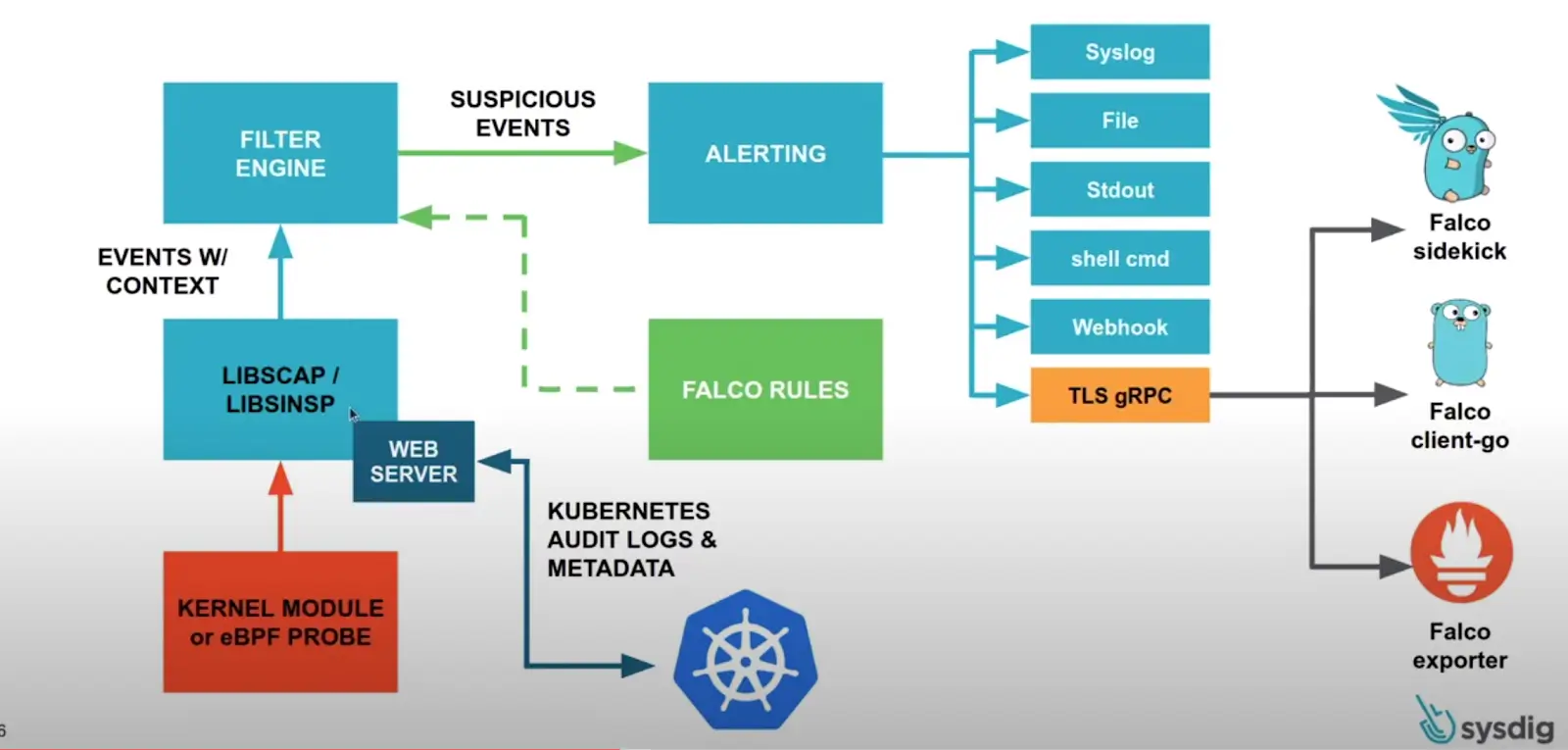
Falco works by reading system events and matching them against rules. If an event matches a rule, Falco generates an alert.
In simple terms:
Runtime event
→ Falco rule
→ Security alert
Falco can detect activities such as:
- a shell being spawned inside a container
- a sensitive file being read
- a suspicious process being executed
- a container trying to access the host filesystem
- a workload making unusual outbound connections
- privilege escalation behavior
- activities that do not match the normal baseline of an application
Falco does not replace logs, metrics, or traces. It adds another layer of security signals from runtime behavior.
How Falco Works
At a high level, Falco works like this:
Linux / Container / Kubernetes Runtime
→ system events
→ Falco engine
→ Falco rules
→ alerts / logs / notifications
Falco reads runtime events, such as syscalls or Kubernetes audit events. These events are then evaluated against rules.
If an event matches a rule condition, Falco generates an alert.
For example:
A shell was spawned in a containerOr:
Sensitive file opened for reading by a non-trusted processThese alerts can be sent to different destinations depending on the setup. They can go to stdout, files, syslog, webhooks, Slack, an event pipeline, a SIEM, or another observability stack.
In production, Falco is usually not useful as a standalone tool only. It becomes much more valuable when its alerts are connected to a clear investigation workflow.
Core Falco Concepts
Before using Falco, there are several core concepts worth understanding.
Runtime Event
A runtime event is an activity that happens while the system is running.
Examples of runtime events:
- a process is created
- a file is opened
- a network connection is made
- a command is executed
- a container is created
- a Kubernetes resource changes
Falco reads these events to detect suspicious behavior.
Syscall
A syscall is how a program interacts with the Linux kernel.
When a process reads a file, opens a network connection, creates a new process, or executes a command, that activity can appear as a syscall.
Falco can use syscalls as a source of signal to detect runtime activity.
This is what makes Falco different from regular application logging. Falco does not only depend on what the application writes. It observes behavior happening at the system level.
Rule
A rule is an instruction Falco uses to decide whether an event is suspicious.
A rule usually contains:
- rule name
- condition
- alert output
- priority
- tags
Conceptually, a rule can be described like this:
If a shell is spawned inside a container,
and the container is not part of a workload that normally needs a shell,
then generate an alert.
Rules allow Falco to be adapted to the needs of an environment.
Condition
A condition is the part of a rule that determines when an alert should be generated.
For example:
event type is execve
and process name is bash
and the workload is running inside a container
Conditions need to be designed carefully. If they are too broad, they can generate too many alerts. If they are too strict, important events might be missed.
Output
Output is the alert message generated when a rule matches.
A useful alert output should contain enough information for engineers to investigate.
Useful information can include:
- rule name
- process name
- command executed
- container name
- pod name
- namespace
- user
- node
- severity
- timestamp
Good output helps speed up triage.
Priority
Priority represents the importance of an alert.
Common priorities include:
- DEBUG
- INFORMATIONAL
- NOTICE
- WARNING
- ERROR
- CRITICAL
Not every alert is a major incident. Priority helps distinguish what needs urgent investigation and what only needs observation.
Examples of Activities Falco Can Detect
Falco can detect many types of runtime activity.
Here are some common examples.
A Shell Spawned Inside a Container
In production, a container usually runs the main application process, not an interactive shell.
If bash or sh suddenly runs inside a container, that can be an important signal.
It does not always mean malicious activity. It could be an engineer debugging something. But it should still be visible.
A shell was spawned in a containerAn alert like this helps platform or security teams know that manual activity happened inside a workload.
A Sensitive File Was Read
Falco can also detect access to sensitive files.
Examples:
/etc/shadow
/etc/passwd
/root/.ssh
/proc
Not every sensitive file access is malicious, but this kind of activity deserves attention, especially if it is performed by an unusual process.
An Unusual Process Was Executed
A container usually has predictable behavior.
For example, an API service normally runs only the application binary. If another process such as curl, wget, nc, or a shell tool suddenly appears, that can be suspicious.
Falco can help detect this type of activity.
Access to Host Paths
A container attempting to access the host filesystem can be a serious signal, especially if the workload is not supposed to have host-level access.
Falco can help detect behavior that may indicate container escape attempts or privilege misuse.
Suspicious Outbound Connection
Falco can also be used to detect unusual network connections.
For example, a service that normally talks only to an internal database suddenly opens a connection to an unknown external endpoint.
This can become a useful signal for further investigation.
Falco in Kubernetes
Falco is commonly used in Kubernetes because Kubernetes environments are highly dynamic.
In Kubernetes, Falco can enrich alerts with context such as:
- namespace
- pod name
- container name
- image
- node
- labels
- Kubernetes resource context
This context matters because an alert that only says:
shell spawnedis not enough for investigation.
A more useful alert would say:
shell spawned in pod payment-api-7d9f9c in namespace production on node ip-10-0-1-20With Kubernetes context, engineers can quickly understand which workload needs attention.
Falco also helps platform teams observe runtime activity that may not be visible from deployment manifests alone.
A manifest can look safe, but runtime behavior still needs to be monitored.
Falco and Security Logs
Falco generates security logs or security alerts based on runtime behavior.
This is different from application logs.
Application logs usually answer:
What does the application say is happening?Falco alerts answer:
What does the system observe is happening?Both are important.
An application may never write a log when someone opens a shell inside a container. But Falco can observe that runtime event.
An application may not record that a specific process read a sensitive file. But Falco can detect it from system activity.
This is why Falco fits well as part of security observability.
When Falco Becomes Useful
Falco becomes useful when we want visibility into runtime behavior.
Common use cases include:
- detecting manual activity inside production containers
- detecting suspicious commands inside pods
- observing access to sensitive files
- detecting privilege escalation behavior
- detecting containers trying to access host paths
- enriching security incident investigations
- sending runtime security alerts to a SIEM or alerting pipeline
- supporting runtime audit trails and compliance needs
Falco is also useful for platform engineers because it helps answer:
What actually happened inside the workload after it was deployed?Not only:
What is written in the manifest?Things to Watch Out For
Falco is powerful, but there are several things to keep in mind.
Alert Fatigue
If rules are too many or too sensitive, Falco can generate too many alerts.
When there are too many alerts, engineers may start ignoring them.
This is dangerous because important alerts can get buried in noise.
False Positives
Not every alert means there is an incident.
For example, a shell inside a container could be part of a legitimate debugging session. Access to a specific file might be normal for a certain workload.
This is why rules need to be adjusted based on the environment baseline.
Rule Tuning
Falco becomes much more useful when rules are tuned for the organization’s context.
Default rules can be a good starting point, but production environments usually need tuning.
Rule tuning helps distinguish normal behavior from suspicious behavior.
Sensitive Data in Alerts
Alert output should be informative, but it must not leak sensitive data.
Avoid including tokens, secrets, passwords, personal data, or sensitive payloads in alert output.
A security tool also needs to be safe in the way it stores and sends data.
Response Workflow
Alerts without workflow become noise.
Before using Falco seriously, it should be clear:
- where are alerts sent?
- who receives them?
- when should an alert be investigated?
- how is severity determined?
- what is the first response step?
- when should the alert be escalated?
Falco is not only about installing a tool. It needs to be part of an operational and security response workflow.
Falco Is Not a Silver Bullet
Falco helps with runtime security monitoring, but it is not a single solution for every security problem.
Falco does not replace:
- image scanning
- dependency scanning
- secret scanning
- network policy
- RBAC hardening
- admission control
- vulnerability management
- secure CI/CD
- audit logging
Falco is better understood as one layer of defense.
In security, visibility is an important part of defense. But visibility needs to be combined with prevention, hardening, response, and continuous improvement.
Closing
Falco helps us observe security signals from runtime behavior.
If logs tell us what the application writes, metrics show numerical patterns, and traces explain the journey of a request, then Falco helps us see suspicious activity happening while workloads are running.
In Kubernetes and Linux environments, this kind of visibility is important.
Not every important activity appears in application logs. Sometimes, the most important signal comes from the behavior of the system itself.
Falco makes that signal easier to see, understand, and act on.
In the end, the goal of using Falco is not to make the system look more complex. The goal is to notice unusual runtime behavior faster.
And in security, seeing faster can often be the difference between a small incident and a much bigger problem.